Today
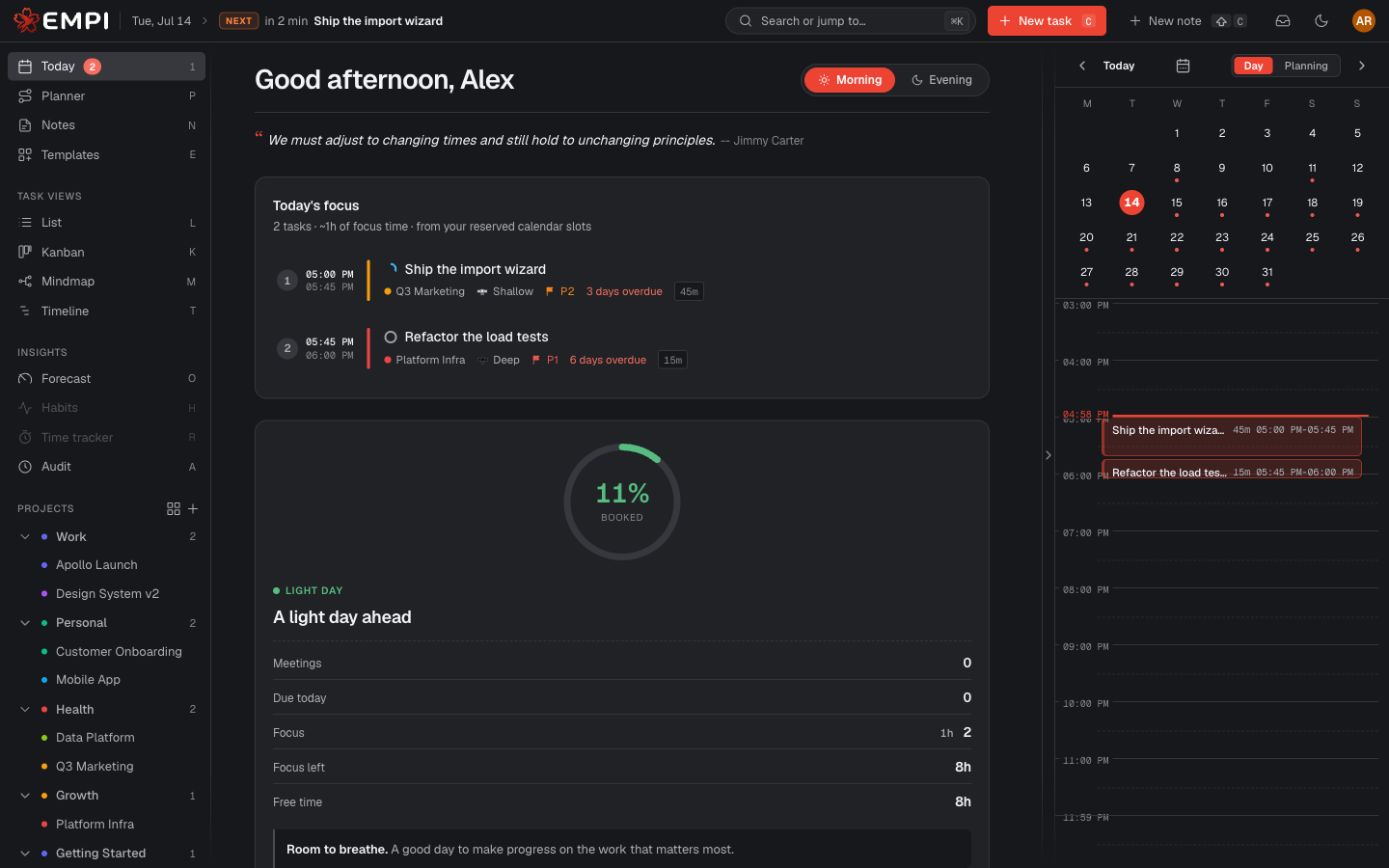
Today is the view you live in. It answers one question: what should you work on right now, and when is it booked?
Morning and Evening
At the top you get a greeting and a Routine mode toggle: Morning and Evening. Morning is the default and shows the day ahead. Evening switches to the wind-down routine that closes today and plans tomorrow. See Morning and evening routine.
Today's focus
Today's focus is a ranked list of what to work on, in order. Each entry shows the reserved time window it is booked into, so "next" is not an opinion, it is a slot on your calendar. Tasks without a reservation appear as suggested anchors: reserve time to lock them in.
The ranking is computed on the server from your real calendar, your working hours and each task's due date, estimate, priority and focus type. It is not a guess made in your browser, and it is the same ranking every client sees.
The day load
A ring shows how much of the day is already booked, as a percentage, with a headline that reads Day off, Light day, Busy day or Packed.
Under it, the day summary breaks the number down:
| Row | What it counts |
|---|---|
| Meetings | Calendar events, from your connected agendas |
| Due today | Tasks whose due date is today |
| Focus | Focus time reserved for tasks today |
| Focus left | Reserved focus time still ahead of you |
| Free time | Working time that is neither booked nor held |
Every one of these numbers comes from the backend, computed against your real calendar and your time slots. If a day is over capacity, Empi says so instead of quietly overbooking you.
Delivery confidence
Next to the day load, a second ring answers a bigger question than "how busy am I today": will this week actually land? It aggregates each task's capacity-versus-required ratio over the next 7 days and gives you the verdict in one line, from "You're on track this week" to "This week is at risk".
The day load tells you about today. Delivery confidence tells you whether today being fine is enough.
The calendar rail
On the right, a rail shows the day itself:
- A mini month for jumping to another day.
- A Day / Planning toggle. Day shows what is on your calendar. Planning shows the same day through the planner's eyes.
- Time-positioned blocks: meetings, focus reservations, breaks and commute legs, drawn at the hour they actually happen.
- A live now-line that tracks the current time.
- Reserve holds drawn as a hatch. That is time held aside for incoming meetings, so it is not free, but it does not count as busy either.
NOW and NEXT
The topbar carries a NOW / NEXT strip: the block you are in and the one coming up. It follows you across every view, so you never have to come back to Today to check what is next.
Tip
If Today looks empty, it usually means your tasks have no estimate or no due date, so the planner has nothing to place. The Planner lists those tasks under NOT PLANNED YET.