How Empi schedules your work
Scheduling is the thing Empi does that a task list does not. The planner takes your tasks and lays out when each piece of work actually happens, day by day, so you can see before any deadline arrives whether everything fits, and act on what does not.
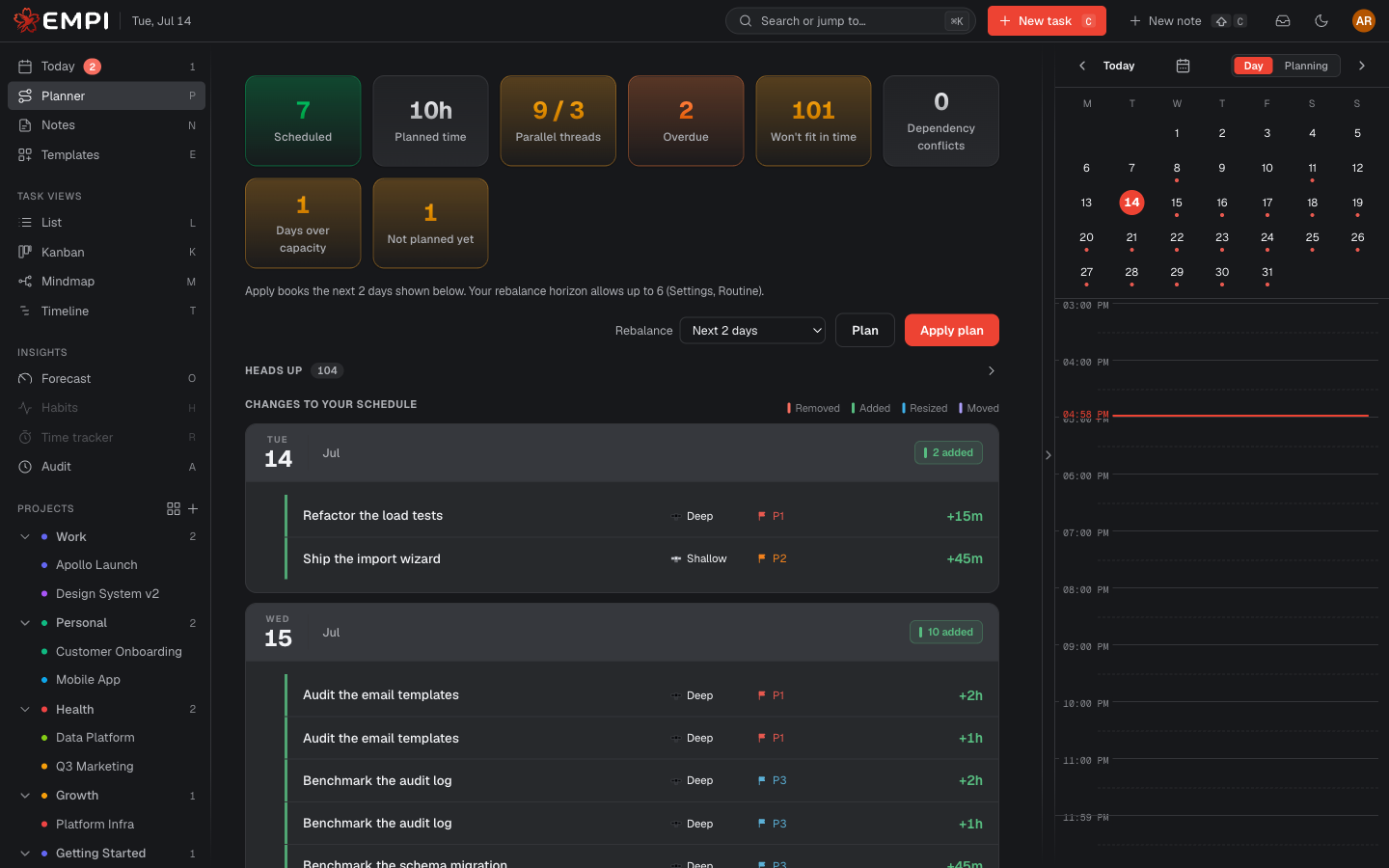
What the planner produces
A proposal: a set of calendar reservations, day by day, that would get your work done on time. Nothing is booked when the planner runs. It only ranks and forecasts. Turning a proposal into real calendar blocks is a separate, explicit step. See Reserving time.
The Planner view is where you look at that proposal, review what would change, and apply it.
What gets scheduled
A task is scheduled only when all of the following are true:
- It is a leaf. It has no subtasks. A task with subtasks is skipped and its subtasks are scheduled instead, because the parent's estimate is just the sum of its children and scheduling both would book the same work twice.
- It is assigned to you. The planner plans your work, never a teammate's.
- It is not Done. Every other status is scheduled, including Backlog.
- It has BOTH a due date and an estimate. Without a deadline there is nothing to plan against; without a size there is nothing to fit.
A task that clears everything except the due date or the estimate is not silently dropped. It is listed under Not planned yet with the reason ("Needs a due date", "Needs an estimate", or both), and one click takes you to the task to add it.
The planner also skips work you have already booked by hand. Time you pinned yourself normally stays in place and reduces what is left to schedule. The one exception is calendar self-healing: if a focus block later overlaps a meeting, commute or multi-day away event, Empi frees that conflicting block and replans its unfinished minutes on a day with room. A reserve window is your own hold and never triggers that recovery.
The order tasks are considered
Two things decide the order, in this precedence: dependencies, then the sort key.
Dependencies come first, and they are hard. A task is only placed after everything it is blocked by.
Among the tasks whose dependencies are satisfied, the order is:
- Overdue first. Anything already past its due date goes to the top.
- Work in progress next. A task with the Doing status is favoured over not-yet-started work, even if its due date is later. Finish what you started.
- Earliest due date.
- Highest priority (P1 above P4).
- Least work remaining, as a final tie-break, so the plan never reshuffles itself for no reason between two runs.
How work is packed into days: the deadline is king
The planner walks that ordered list and pours each task into the earliest days that still have free capacity, up to its due date. Because earlier-due tasks are placed first, they claim the earliest capacity and later work flows into whatever is left. That is what makes deadlines king: if the capacity to finish a task before its due date exists, the task gets it.
A few consequences worth knowing:
- Today only offers the part of the day that is still ahead of you. Time that has already elapsed is not bookable capacity.
- A task too big for one day is split across consecutive days. You do not have to chop it up yourself.
- A task's start date is a floor. The planner never books it earlier, so a task whose start equals its due lands on that one day instead of being pulled forward.
- Blocks are clean. Every reserved block is a multiple of five minutes, never larger than your maximum slot size and never smaller than your minimum slot size. The leftover below the minimum is deliberately left unscheduled: it is small enough to absorb between meetings rather than clutter your calendar with a tiny block.
Both slot sizes are yours to set. See Working hours and focus hours.
Focus shaping: deep work in your peak hours
Each day's free capacity is split into two buckets: the peak minutes (the time that falls inside both your working hours and a peak focus window) and everything else.
Deep tasks draw from the peak bucket first and spill outside it only when it is full. Shallow tasks draw from the rest of the day first. The net effect is that deep work lands in your best hours and shallow work stays out of them.
This is a soft preference on slot quality, nothing more. It never changes which task is scheduled, its order, or its due date. A P1 shallow task still cedes a peak slot to a deep task, and a shallow task spills into peak time rather than going unscheduled. If you declare no peak focus windows, the planner behaves exactly as it would without the feature.
You can also tell the planner what to optimise for when it lays a task's minutes into clock slots: Focus first (the default, which lets a task be split across the day to land in the best slots) or Reduce switching (which keeps a task's blocks for one day in a single continuous run). Both are in Settings, under Tasks.
Rest breaks
You are not a machine, and the plan should not pretend you are. You declare rest in minutes: after how much continuous work a break is owed, and how long that break lasts.
When placing the next block would push your continuous-work run past that limit, the planner reserves a Break immediately before it, then resets the run. A break is a real reservation on your calendar, not a hole in the schedule: it is visible, it reads as busy to other people, and it is counted against the day's capacity, so the plan does not quietly over-pack you.
Any natural gap that is at least as long as your break duration already counts as the break. Free time, a meeting, and a commute all reset the run, so Empi does not stack a break on top of a lunch you already have.
Parallel threads (pipes)
A thread is one open piece of work. A whole parent task counts as a single thread: working three subtasks of "Website redesign" is one context, not three. Meetings are not threads. Only task work is.
Your pipes target is how many threads you want to juggle on a given day. A thread holds its slot every day from the first day it is worked until it is finished, even on idle days in between, which is what nudges you to finish what you started before opening something new.
Pipes is a soft target, not a wall. The precedence is: due date, then pipes, then priority. The planner will never miss a deadline just to stay under your pipe count. It lays out the full feasible plan and, if that needed more threads than you asked for, it tells you: "fits, but needs 5 parallel threads instead of 3". The plan is correct, the number is information, and what you do about it is your call.
Nothing is hidden
When something cannot work out, the planner shows the full attempted plan plus a warning, under Heads up. It never quietly drops your work.
| Warning | What it means | What you do |
|---|---|---|
| Overdue | Already past its due date. Scheduled first anyway. | Reschedule it, or accept that it is late. |
| Won't fit in time | It cannot finish on or before its due date, even using all the capacity there is. | Extend the due date, cut the estimate, or reprioritise the work competing with it. Empi tells you which of the two causes applies and offers a one-click "Extend due to |
| Too many at once | The plan needed more parallel threads than your pipes target. | Accept the extra context-switching, or push some due dates out. |
| Dependency conflict | A blocker is due after the task that waits on it, or there is a dependency cycle. | Fix the dependency or the dates. Scheduling alone cannot save this one. |
Alongside the warnings, the Not planned yet list holds everything that never entered scheduling for want of a due date or an estimate. Between the two, you always know why a task is, or is not, in your plan.
Note
Splitting a task is never offered as a fix for "Won't fit in time". The planner already spreads a task across days by itself, and splitting leaves the total estimate unchanged. It cannot create capacity. The honest remedies are a later due date, a smaller estimate, or reprioritising what competes with it.
It plans around reality
Capacity is not "the hours in your working day". It is the hours that are actually free. The planner subtracts everything that is genuinely unavailable:
- Meetings and events on your connected agendas. Every timed event on a calendar you use for scheduling is busy time. That includes lunch: an event's type decides which bucket its minutes report under, never whether the time is free.
- Commute legs. When a meeting has an address, the travel time before and after it is busy too, so the planner never packs work into the gap you spend on the road.
- Reserve windows. Time you hold open for incoming meetings is a hard hold. Focus work is never placed inside it.
- Off hours. Time outside every one of your windows is never scheduled, and neither are your existing breaks.
- Time you booked by hand, which is pinned unless it later conflicts with newly unavailable time, as described above.
Overlapping busy time is counted once, and multi-day events take out every day they cover. Vacation and out-of-office events that remove the whole day's focus capacity are also named in the evening wrap, so the number and the explanation both match the time you really had.