Timeline
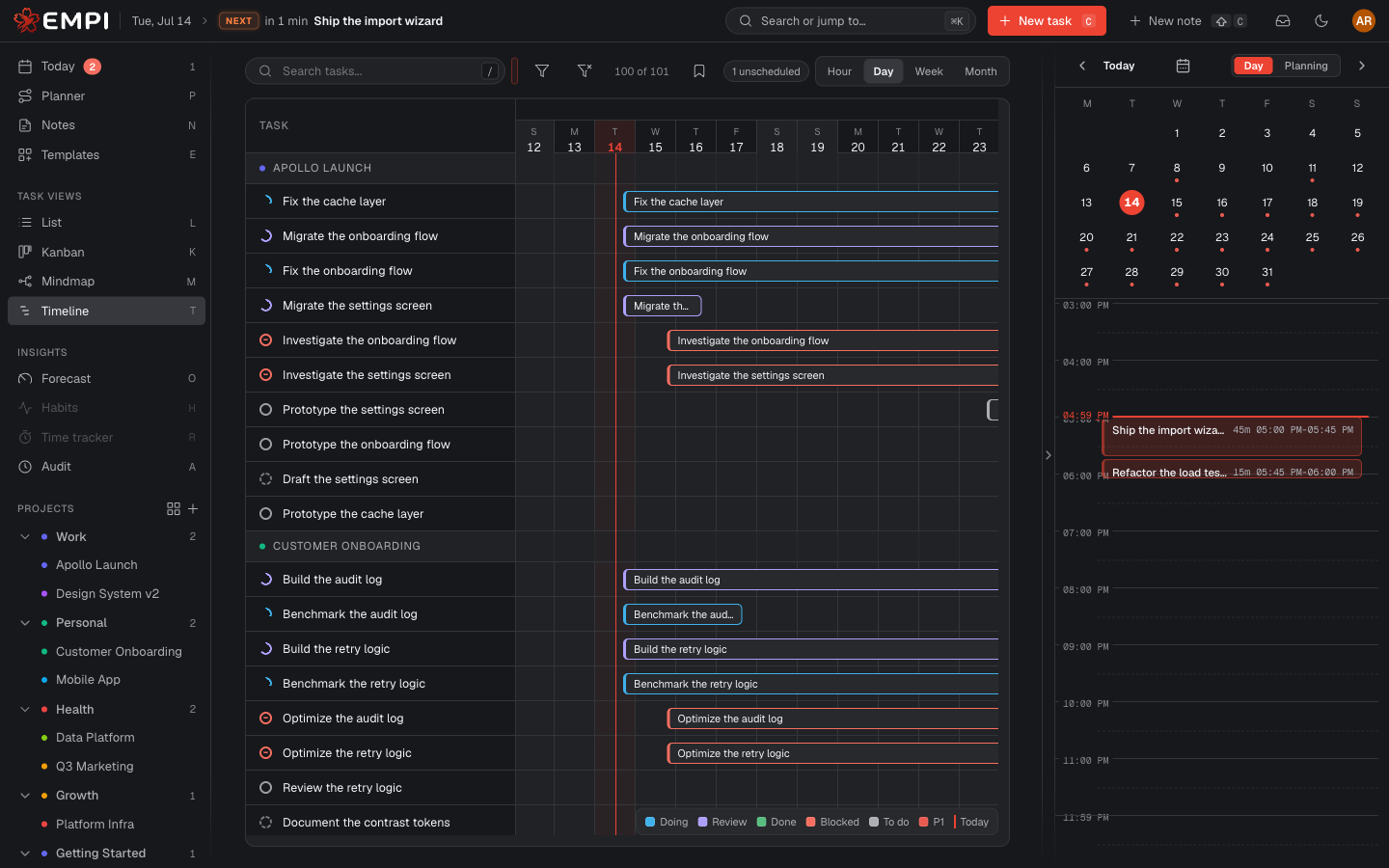
The Timeline is the Gantt-style view, at /app/gantt. It plots your tasks across
time so you can see overlaps, gaps and dependency chains at a glance.
Reading the chart
Each task is a bar spanning from its start date to its due date. Tasks are listed on the left, grouped by project, with a count of how many are scheduled and how many are still unscheduled (no dates, so no bar).
Bars are colored by status: To do, Doing, Review, Blocked, Done. A marker shows today, so "behind" is visible without doing any arithmetic.
Zoom with the Hour / Day / Week / Month control to go from a single day to a whole quarter.
Changing dates
- Drag a bar sideways to move the task: start and due date shift together.
- Drag an edge to resize it: you change one date and keep the other.
Every move is a real edit to the task's dates. If a move is not what you wanted, the toast that appears offers Undo.
Dependencies
Dependency arrows are drawn between bars, so you can see what has to finish before what. A task whose dependency is due later than it is will show up as a dependency conflict in the Planner.
Note
Moving a bar changes the task's dates. It does not book calendar time. Real reservations come from the Planner and the planning rules.