Activity log
The audit log at /app/audit records every change across the workspace: who
changed what, when, and from where. It is visible to owners and admins.
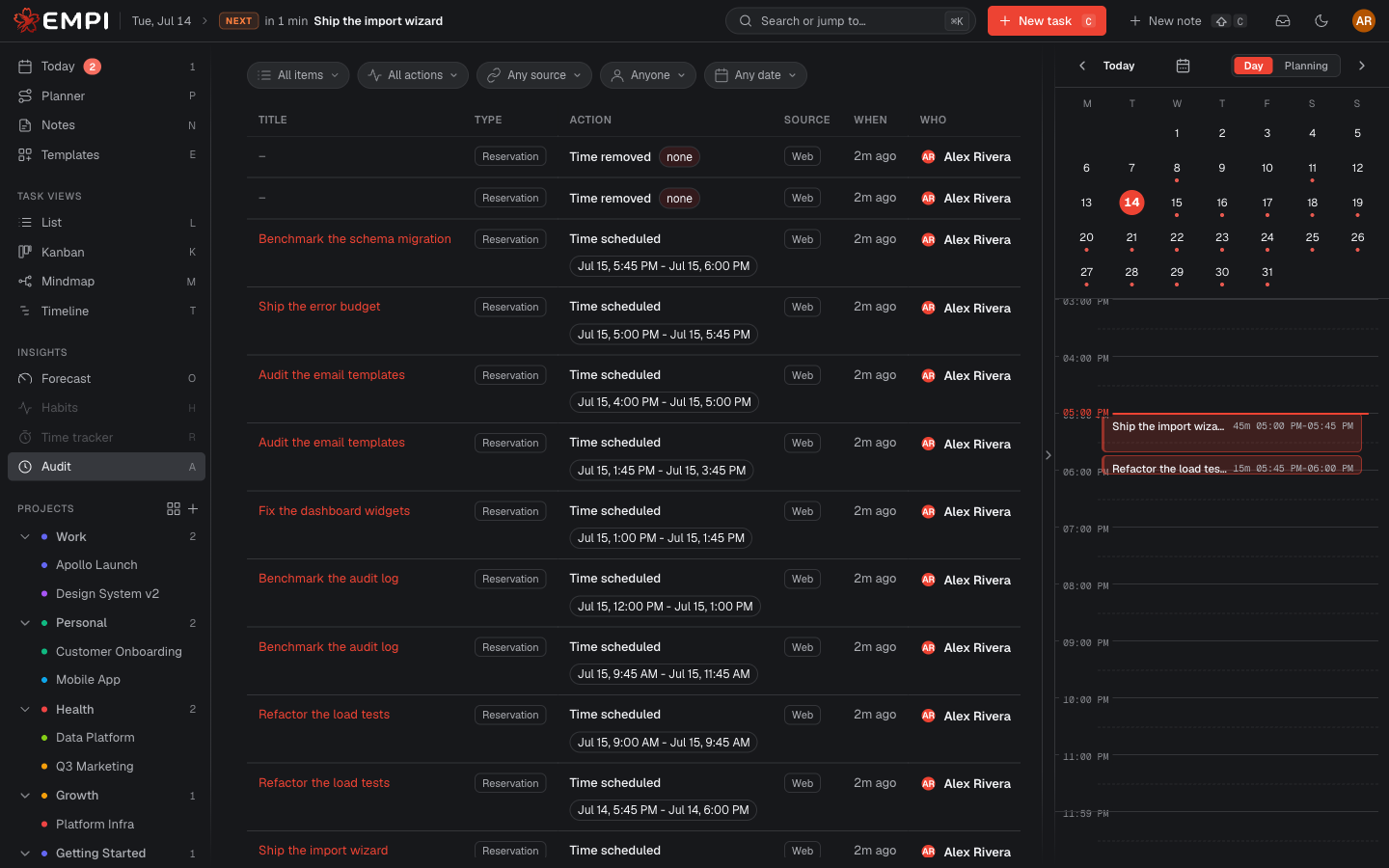
The feed
An infinite activity feed, newest first, with Load more at the bottom. Each row tells you the item's Title and Type, the Action, the Source, When it happened and Who did it. Click the title to open the item itself.
Actions you will see: Created, Field changed, Description edited, Dependency added, Dependency removed, Deleted, Time scheduled, Time rescheduled, Time removed.
Filters
Four filters narrow the feed:
- Item type: All items, Tasks, Reservations.
- Action: any of the actions above, or All actions.
- Source: Any source, Web, API, Gmail extension, Gmail add-on, MCP, System.
- Date: Any date, or a specific day.
Clear resets them.
What changed
For a field change, View changes expands a field-level diff: the old value and the new one, for Title, Status, Priority, Focus, Project, Parent, Start date, Due date, Estimate, Assignees, Labels and Calendar. Rescheduled blocks show the reason that was given, when there was one (a Push in the evening routine records why).
Source: where a change came from
The Source column is the one that saves arguments:
| Source | Meaning |
|---|---|
| Web | Someone made the change in the Empi web app |
| API | A change made with a personal access token against the API |
| Gmail extension | A task or note captured from the Empi browser extension for Gmail |
| Gmail add-on | A task or note captured from the Google Workspace Gmail add-on |
| MCP | An AI assistant or editor acting through the Empi MCP server |
| System | Empi itself: the planner booking or reclaiming time, calendar sync, maintenance |
So when a reservation moves and nobody remembers touching it, the log tells you whether the planner did it, an MCP client did it, or a person did.