Plans and billing
Empi has two plans: Free and Pro. Your plan sets your storage allowance, your monthly quota for external services, and how far ahead Empi will plan for you. You find all of it in Settings > Plan & Usage.
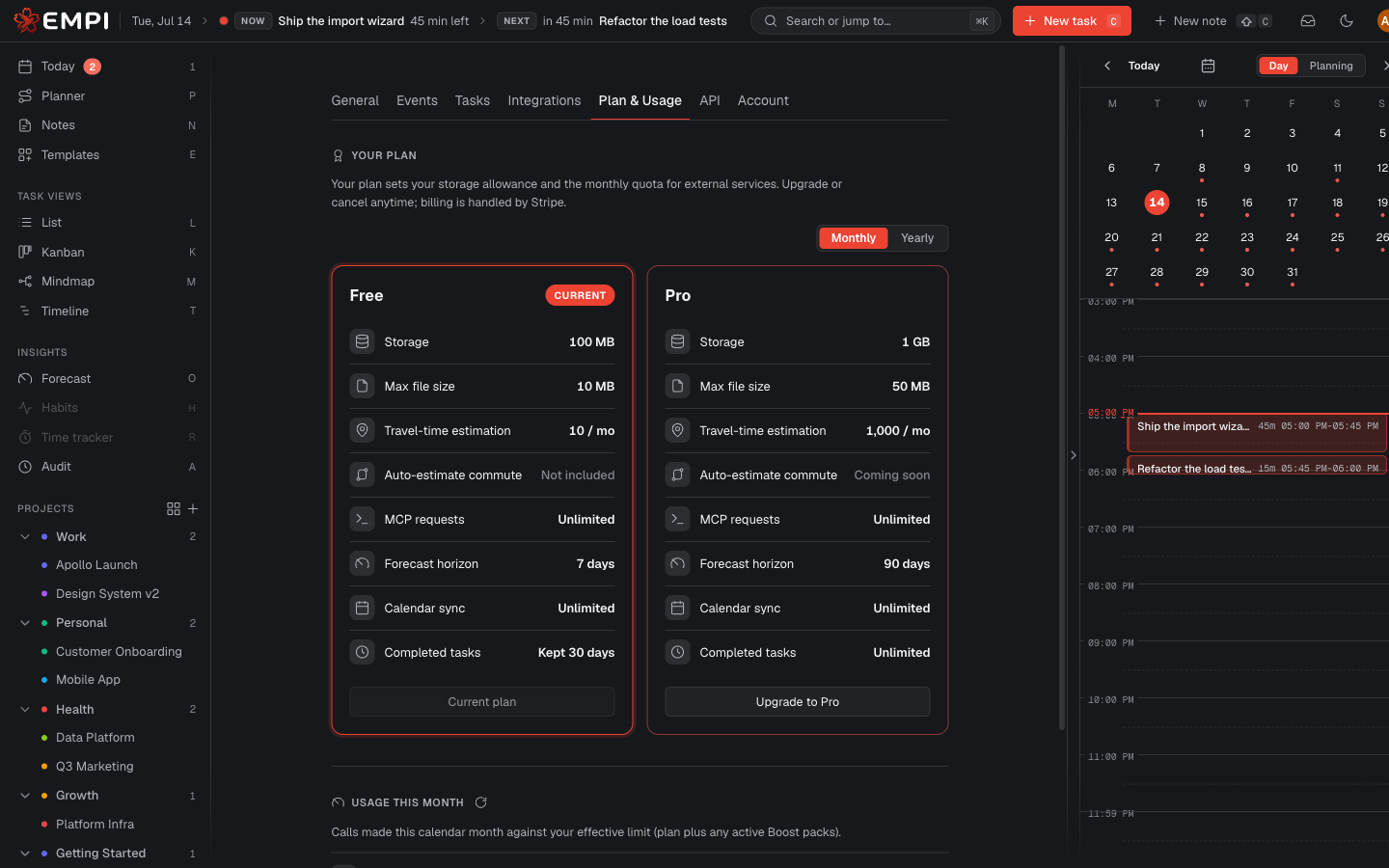
Free vs Pro
| Free | Pro | |
|---|---|---|
| Storage | Included allowance, shown on the plan card | A larger allowance, shown on the plan card |
| Max file size | Per-plan limit, shown on the plan card | A larger limit, shown on the plan card |
| Forecast horizon | 7 days | 90 days |
| Completed tasks | Kept 30 days, with their files | Kept indefinitely |
| Calendar sync | Included | Included |
| Travel-time estimation | Included | Included |
| Auto-estimate commute | Not included | Included |
| MCP requests | Unlimited | Unlimited |
A few things worth spelling out.
Forecast horizon. Forecast looks 7 days ahead on Free and 90 days ahead on Pro. The same ceiling caps the planner's rebalance horizon in Settings > Tasks.
Done-task retention. On Free, a task you complete is kept for 30 days, together with its files, and then removed. On Pro, completed tasks are kept indefinitely. If you rely on your history, this is the difference that matters.
MCP requests are unlimited on every tier. Connecting your AI tools is never rationed, on any plan. See AI assistants (MCP).
Storage, usage and boost packs
The Usage this month section shows the calls made this calendar month against your effective limit, service by service (calendar sync, travel time and directions, AI, encryption keys, MCP). Refresh usage re-reads the counters.
If you run out of a quota before the month ends, Raise limit this month activates a Boost pack: extra capacity added on top of your plan's limit for the current month. Once active, the usage row shows your plan limit plus the boost.
Note
Plan limits are enforced by the server, not merely hidden in the interface. A limit is a limit whichever client you use, including your own scripts through the API or an AI tool over MCP.
When you hit a plan limit, Empi shows a notice explaining what to do next: on Free, that is upgrading to Pro; on Pro, that is contacting support.
Buying Pro
Choose the Pro card, pick a Billing period (Monthly or Yearly), and use Upgrade to Pro. Empi hands you off to Stripe hosted Checkout, so your card details go to Stripe and never through Empi. Once the payment is received, your Pro plan activates.
If you cancel at the Checkout page nothing happens: you stay on Free.
Once Pro is active, a Pro badge appears next to the Empi logo in the top left, so you can tell at a glance which plan the workspace is on.
Managing your subscription
Manage subscription opens the Stripe Customer Portal. From there you can:
- cancel your subscription,
- change the card on file,
- download your invoices.
Anything that affects what you pay is handled by Stripe, which is also what keeps your plan status authoritative and up to date inside Empi.