Commute and travel time
A meeting at the other end of town does not cost you an hour, it costs you an hour plus the journey there and back. Empi works out that journey and books it as real blocks on either side of the event, so it never schedules focus work into time you will spend travelling.
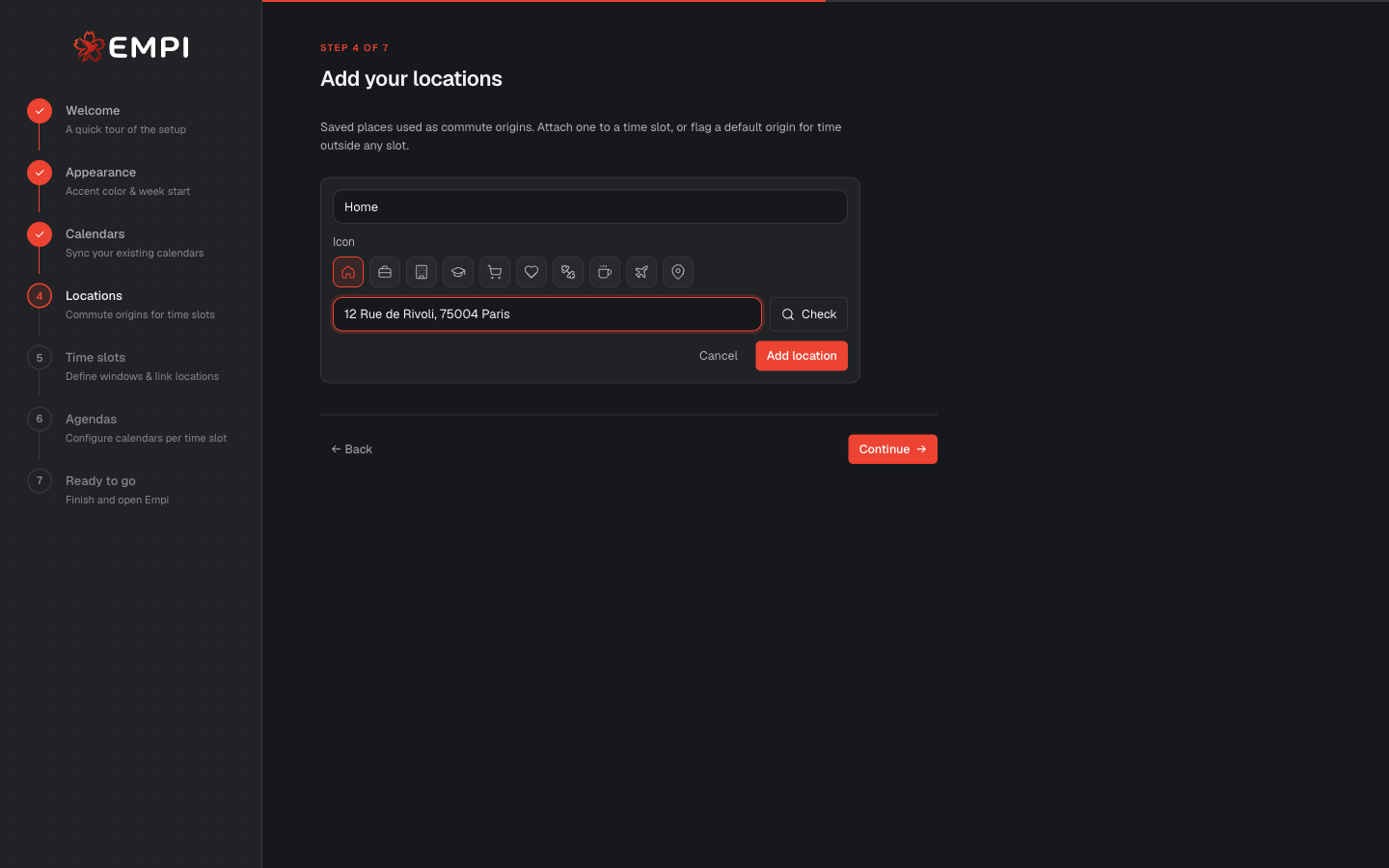
Locations
A location is a saved place: Home, Work, the gym, the school. Empi uses them as commute origins, the point you travel from.
Add them in Settings > Events, in the Transport section under Locations, or during the Locations step of the setup wizard. Each one takes a Name (e.g. Home, Work), an Address, and an Icon.
Pick the address from the suggestions as you type rather than free-typing it. The suggestion is a real, resolved place, which is what makes the travel estimate accurate. Use Edit on a saved location to check or correct it.
Empi ships with none: start with Home and Work, and add the rest when you notice a journey Empi does not know about.
Attach an origin to a time slot
Empi needs to know where you start from, and that changes across the week: you leave from home in the evening and from the office on a Tuesday afternoon.
So the origin is attached to a time slot. Open a time slot in Settings > Events and set its Commute origin: where you travel from during that slot. Empi uses it as the start point when it estimates the trip to a meeting that falls in those hours.
Travel blocks on your day
When an event has an address, Empi estimates the route and turns it into travel time around the event:
- Outbound, before the event.
- Return, after the event.
They appear as their own blocks on Today and in the day grid, right next to the meeting, with the travel time on them. They are not decoration: the planner reads them as unavailable time, exactly like the meeting itself. A 30-minute gap that is really a 25-minute drive will not be filled with a focus block.
Empi is smart about chained events. If your next event is already nearby, there is no return trip to book, and the panel tells you so ("No return trip: your next event is nearby"). It also warns you when the numbers do not work: Not enough time to travel when two events are too close together to physically get between them, and Long commute when a journey is unusually heavy.
Estimating and re-estimating
Open the event and use Edit commute to see and change the estimate. You can:
- Choose the travel mode: Car, Bike, or Bus / train.
- Choose the origin, or leave it on Auto (time-slot location) so it follows the slot the event falls in.
- Hit Estimate travel to pull a live route for the chosen mode and refresh the times. Do this whenever an address, a mode or a meeting time has changed and you want the numbers rechecked.
Save it and Empi confirms: "Commute time reserved on your calendar."
In Settings > Events > Transport you can set the defaults once: your Default travel mode, the Travel before and Travel after minutes used when no route can be estimated, and a Margin before / Margin after to add to every estimated route, because nobody arrives at exactly the minute the map says.
Note
Automatic travel-time estimation for new located events is a Pro feature, since it queries a live routing service. On the Free plan you can still set commute time by hand.